
Python Developer Tutorial
Scrape Google Search Results with Python
If you need scrape Google search results Python, the first implementation usually works just long enough to be misleading. The real challenge starts when the workflow has to survive blocking, parser changes, and recurring production load.
Every developer reaches this point: you need Google search results inside your app for rank tracking, SEO analytics, AI datasets, lead generation, or competitor monitoring. Most teams start with a naive script, then hit 429 errors, CAPTCHA pages, empty HTML responses, and eventually blocked IPs. If your current approach can scrape Google search results Python only for a short run, this guide explains the failure modes first, then shows a production-safe workflow with retries, polling, and pagination.

Why scrape Google search results Python matters for developers
Start with a direct request and parser. This baseline matters because it shows why initial success can be misleading. You might get parseable HTML for a few requests and assume the job is done, but production scraping quality is measured over time and volume, not by one isolated response.
Search-result collection usually feeds rank tracking, competitor monitoring, AI dataset collection, or lead generation workflows. Those use cases need clean schemas, reliable retries, and blocked-response detection instead of one lucky HTML response.
Step 1 - simple Python scraper
# direct scraping baseline for comparison
import requests
from bs4 import BeautifulSoup

query = "best laptops 2026"
url = f"https://www.google.com/search?q={query}"

headers = {
    "User-Agent": "Mozilla/5.0"
}

response = requests.get(url, headers=headers, timeout=30)

soup = BeautifulSoup(response.text, "html.parser")

for result in soup.select("h3"):
    print(result.text)
This script intentionally has no queueing, no anti-block strategy, no retry policy, and no schema guardrails. It is useful for a proof of concept, but it is not a reliable extraction system yet.
Common problems and how to fix them
The next stage is predictable. After repeated requests, Google starts returning challenge pages, partial responses, or rate-limit status codes. Your parser still runs, but the input is no longer a valid SERP document. This is where most prototypes become unstable.
- CAPTCHA challenge HTML replaces normal result markup.
- HTTP `429` appears during burst traffic or tight retry loops.
- HTTP `503` appears when suspicious traffic is throttled.
- Unusual traffic detection text appears in page titles and body content.
HTTP/1.1 429 Too Many Requests

or

HTTP/1.1 503 Service Unavailable

<title>Sorry...</title>
Our systems have detected unusual traffic from your computer network.
To continue, please complete the CAPTCHA.
At this point the bottleneck is no longer selector parsing. The bottleneck is trust, behavior, and delivery infrastructure.
Python scripts start returning CAPTCHA or unusual traffic pages.
Detect blocked HTML before parsing, store the raw response for debugging, and treat the run as failed instead of saving partial SERP rows.
Parser selectors drift when Google changes module layout or adds more rich results.
Validate minimum result counts, separate organic parsing from module parsing, and alert when expected fields disappear between runs.
Retries turn into rate-limit storms once a batch job hits blocking.
Use bounded retries with exponential backoff, queue work per query, and avoid retrying every blocked request immediately.
Why Google blocks web scrapers in production environments
Datacenter IP detection and reputation scoring
Google evaluates request source quality, ASN reputation, and prior abuse history. Traffic from cloud and VPS ranges is often scored as high-risk for automation, especially when query patterns are repetitive.
TLS and transport fingerprinting
Modern detection does not stop at headers. Handshake patterns, protocol behavior, and client implementation details can expose automation signatures.
Browser entropy, cookie challenges, and behavior scoring
Headless clients leak automation patterns through JavaScript APIs, navigator state, and timing behavior. Once trust drops, cookie-bound challenge flows and CAPTCHA checks are served instead of normal SERP payloads.
Dynamic SERP rendering and module completeness
Even before hard blocking, many SERP modules are rendered dynamically. Without browser-grade execution, People Also Ask, local packs, and shopping blocks can be incomplete or missing.
Attempted fixes and why they still fail
Most teams cycle through the same temporary mitigations. Each tactic helps a little, but none removes the operational burden of keeping extraction stable every day.
Rotating user agents
Header randomization helps only superficially. It does not hide transport fingerprints, cookie patterns, or deterministic request timing.
Proxy rotation
Proxy pools can delay bans, but low-trust datacenter ranges burn quickly and increase cost without solving browser-level detection.
Selenium or Puppeteer
Headless browsers extend runtime but are expensive per request, memory-heavy, and still detectable when behavior remains synthetic.
CAPTCHA solver integrations
Solvers clear some challenges, but detection escalates to behavior and trust signals. Teams often end up in a recurring maintenance loop.
The real problem: this is infrastructure, not parsing
Teams often think scrape Google search results Python is a selector problem. In practice, the expensive part is operating a reliable anti-bot delivery system with predictable latency and failure handling.
- Distributed request queues with backpressure and retry control
- IP pool quality management and geolocation-aware routing
- Block detection, challenge classification, and failover logic
- Browser/runtime fingerprint management across worker fleets
- Cost controls for retries, pagination depth, and concurrency
Python vs OrbitScraper API approach
A SERP API abstracts retrieval, anti-block handling, and normalization into a stable contract so application code can consume structured results rather than brittle HTML.
- Queued request admission with predictable polling states.
- Execution workers that apply retries and backoff centrally.
- Normalized JSON fields for downstream analytics and product logic.
- Fewer moving parts in your codebase and smaller on-call surface area.
OrbitScraper is one example of this approach; your team can then focus on product logic instead of maintaining anti-bot infrastructure. For a broader build-versus-buy view, read Python BeautifulSoup scraper: why it breaks, read the API documentation, view OrbitScraper pricing, and see all use cases.
Scrape Google search results with Python step by step
The following code is designed for production workflow shape, not just demo output. It includes enqueue, poll loop, terminal error checks, and multi-page pagination handling.
Step 2 - Requests plus BeautifulSoup prototype
Most Python teams start here. It is fast to test and the easiest way to see why Google search scraping is a reliability problem rather than a parsing-only problem.
import requests
from bs4 import BeautifulSoup

query = "best programming languages 2025"
res = requests.get(
    "https://www.google.com/search",
    params={"q": query},
    headers={"User-Agent": "Mozilla/5.0"},
    timeout=20,
)
res.raise_for_status()

soup = BeautifulSoup(res.text, "html.parser")
for h3 in soup.select("h3")[:5]:
    print(h3.get_text(" ", strip=True))
Step 3 - Add rotating proxies
Rotating proxies can delay blocking, but they are only one part of the solution. Treat them as a reliability layer, not a complete answer.
proxies = {
    "http": "http://user:pass@proxy.example:8000",
    "https": "http://user:pass@proxy.example:8000",
}
res = requests.get(
    "https://www.google.com/search",
    params={"q": "best ai agents"},
    headers={"User-Agent": "Mozilla/5.0"},
    proxies=proxies,
    timeout=20,
)
print(res.status_code)
Step 4 - Use a headless browser fallback
Headless browsers help when result modules depend on JavaScript or cookie flows, but they still need block detection and resource controls.
from playwright.sync_api import sync_playwright

with sync_playwright() as p:
    browser = p.chromium.launch(headless=True)
    page = browser.new_page()
    page.goto("https://www.google.com/search?q=best+ai+tools", wait_until="domcontentloaded")
    page.wait_for_selector("#search", timeout=8000)
    titles = page.locator("h3").all_inner_texts()[:5]
    print(titles)
    browser.close()
Step 5 - OrbitScraper API implementation
import requests
import time

BASE_URL = "https://api.orbitscraper.com"
API_KEY = "ORS_xxx"

def enqueue(query, page=1):
    enqueue = requests.post(
        f"{BASE_URL}/v1/search",
        headers={"x-api-key": API_KEY, "Content-Type": "application/json"},
        json={
            "q": query,
            "location": "United States",
            "gl": "us",
            "hl": "en",
            "num": 10,
            "page": page
        },
        timeout=30,
    )
    enqueue.raise_for_status()
    return enqueue.json()["jobId"]

def poll(job_id):
    for _ in range(90):
        status = requests.get(f"{BASE_URL}/v1/search/{job_id}", headers={"x-api-key": API_KEY}, timeout=30)
        if status.status_code >= 500:
            time.sleep(1)
            continue
        status.raise_for_status()
        payload = status.json()
        if payload["status"] == "completed":
            return payload["result"]
        if payload["status"] in ("failed", "expired"):
            raise RuntimeError(payload.get("code"))
        time.sleep(1)
    raise TimeoutError("timeout")

def fetch_paginated(query, pages=2):
    rows = []
    for page in range(1, pages + 1):
        for attempt in range(1, 4):
            try:
                job_id = enqueue(query, page=page)
                result = poll(job_id)
                rows.append({"page": page, "result": result})
                break
            except Exception as exc:
                if attempt == 3:
                    raise RuntimeError(f"page_{page}_failed: {exc}")
                time.sleep(0.5 * (2 ** attempt))
    return rows

results = fetch_paginated("best laptops 2026", pages=2)
print(results[0]["result"]["organic_results"][:3])
Step 6 - Pagination and retry wrapper
def fetch_paginated_results(query, pages=3):
    all_pages = []
    for page in range(1, pages + 1):
        for attempt in range(1, 4):
            try:
                job_id = enqueue(query, page=page)
                result = poll(job_id)
                all_pages.append({"page": page, "result": result})
                break
            except Exception as exc:
                if attempt == 3:
                    raise RuntimeError(f"page_{page}_failed: {exc}")
                time.sleep(0.5 * (2 ** attempt))
    return all_pages
Request creation
`POST /v1/search` creates a job and returns a `jobId`. This decouples client latency from upstream fetch time and keeps workers predictable under load.
Polling
Poll GET /v1/search/{jobId} until status becomes completed. Handle failed and expired as terminal outcomes, and retry only transient failures with backoff.
Pagination
Each page is an independent API call. Limit maximum page depth by use case to control cost. Store per-page metadata so troubleshooting is faster when partial batches fail.
Production architecture for Python SERP collection
Once Python scraping moves into production, the architecture matters more than any single library. You need a queue, isolated workers, blocked-response detection, durable storage, and explicit retry budgets so one bad query batch does not poison the rest of the job run.
Client request
    |
    v
Enqueue search job -> Worker pool -> Anti-block / fetch layer -> Parser -> Normalized JSON
    |                    |                |                     |          |
    |                    |                |                     |          -> rank tracker / dataset / lead workflow
    |                    |                |                     -> CAPTCHA / retry / failover handling
    |                    |                -> proxy rotation / browser fallback
    -> poll result / store snapshot
Why this post has the highest implementation ceiling
Python is the language most developers reach for first when they need Google search data. That makes it the highest-traffic tutorial, but it also means the audience ranges from solo builders to SEO platforms and AI data teams. The guide needs to cover quick prototypes and production architecture in the same article.
Example JSON response
{
  "jobId": "job_32ee98db-3378-4d25-a177-1f7f2b8a63fd",
  "status": "completed",
  "result": {
    "search_metadata": {
      "id": "job_32ee98db-3378-4d25-a177-1f7f2b8a63fd",
      "status": "Success",
      "created_at": "2026-02-24T10:21:00.000Z",
      "processing_time_ms": 488,
      "credits_used": 1,
      "source": "live"
    },
    "search_parameters": {
      "q": "best ai tools",
      "location": "United States",
      "gl": "us",
      "hl": "en",
      "device": "desktop",
      "num": 10,
      "page": 1
    },
    "organic_results": [
      {
        "position": 1,
        "title": "Top AI Tools in 2026",
        "link": "https://example.com/top-ai-tools",
        "snippet": "A practical list of tools for coding, research, and automation."
      }
    ],
    "people_also_ask": [
      { "question": "What is the best AI tool?" }
    ],
    "related_searches": [
      "best ai coding tools",
      "ai productivity tools"
    ]
  }
}
search_metadata
Tracks execution details such as latency, credit usage, and status. Use this for health checks and cost reporting.
search_parameters
Echo of effective inputs. Useful for audits when location or language mismatches create confusing rank movements.
organic_results
The primary ranked links. Most rank-tracking and competitor-monitoring pipelines start with this array.
people_also_ask and related_searches
Intent expansion signals for content strategy, keyword clustering, and topical research automation.
Real-world use cases
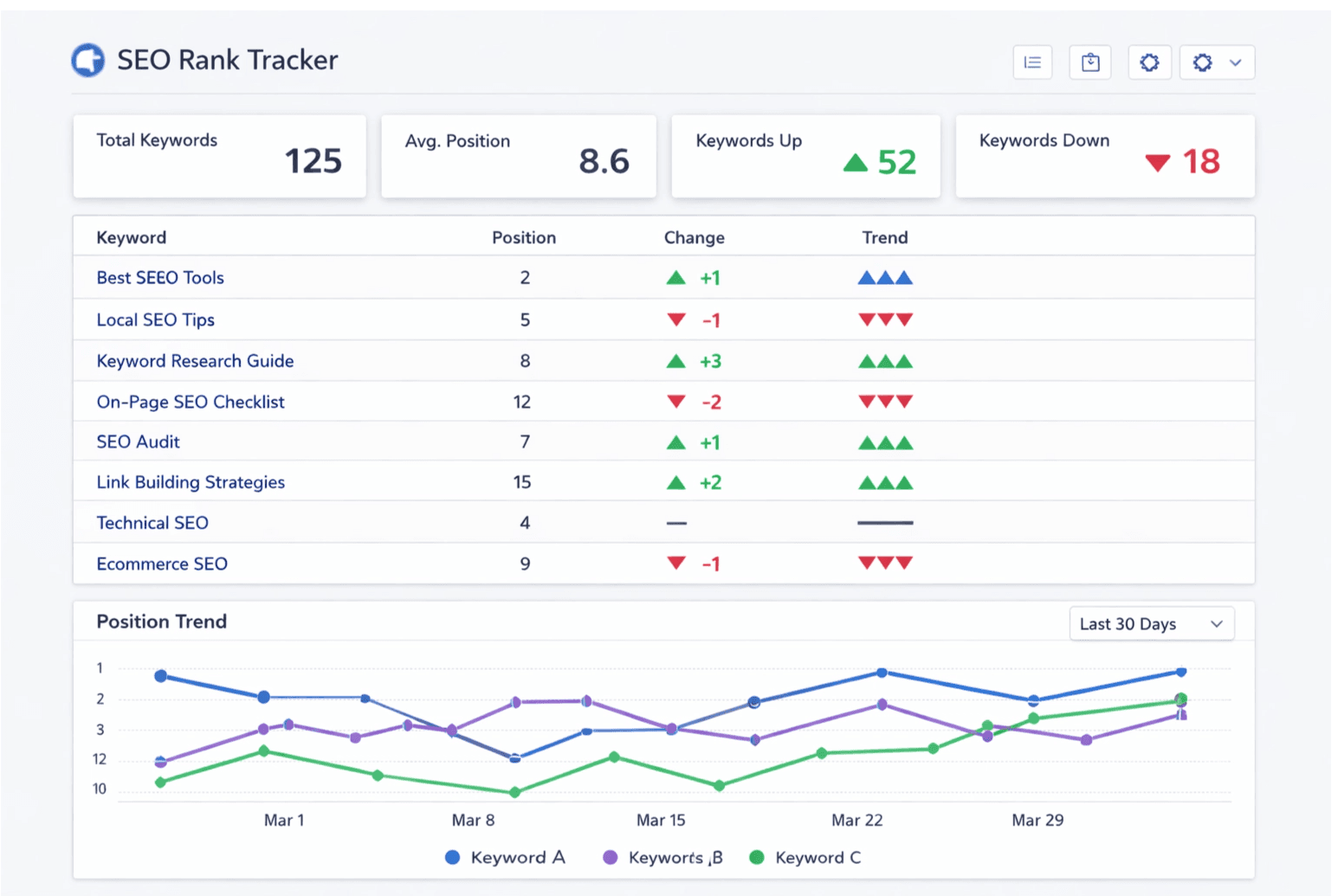
- Keyword rank tracker backends
- SEO analytics products
- AI data ingestion pipelines
- Lead generation enrichment systems
- Competitor monitoring dashboards
- Competitor monitoring by query cluster and domain visibility share.
- Lead generation pipelines that identify ranking pages in niche verticals.
- AI dataset collection for retrieval, evaluation, and prompt-grounded workflows.
Best practices: reliability, cost, and throughput
- Cache repeated queries and low-volatility terms to avoid paying twice for unchanged data.
- Use bounded retries with exponential backoff for transient network and upstream status errors.
- Treat each page of pagination as an independent unit of work with its own timeout and retry budget.
- Store raw response payloads and normalized tables separately so parser changes do not break historical analytics.
- Set concurrency caps per project to prevent retry storms during temporary rate-limit pressure.
- Log request IDs, queue latency, success rate, and error codes as first-class production metrics.
- Run scheduled freshness checks on tracked keywords so dashboards stay current and trustworthy.
- Alert on abnormal credit usage and failure spikes before they become customer-visible incidents.
Related Google scraping queries
These are long-tail questions developers search while debugging scraping workflows. Answering them directly improves implementation quality and helps expand keyword coverage naturally.
- Can Google detect web scraping?
- Is Selenium blocked by Google?
- How many requests before Google blocks an IP?
- Does rotating proxies help for Google scraping?
- How to avoid CAPTCHA when scraping search results?
When DIY scraping still makes sense
Libraries like BeautifulSoup, cheerio, Jsoup, and goquery are still excellent for static sources where anti-bot pressure is low.
- Blog archives and static content hubs.
- Documentation sites with stable HTML structure.
- Public pages without aggressive anti-automation controls.
For Google-like surfaces, reliability usually depends more on delivery infrastructure than parser quality.
Frequently Asked Questions
Why does my Python Google search data script fail after a few requests?
Google detects automation via IP reputation, request behavior, and client fingerprints. Simple requests plus BeautifulSoup scripts get flagged quickly.
Is a User-Agent header enough to avoid blocking?
No. User-Agent spoofing alone is weak because Google also checks TLS, protocol behavior, cookies, and broader browser signals.
Do rotating proxies solve Google scraping blocks?
Only temporarily. Proxy rotation can delay detection, but long-term reliability still requires robust anti-bot infrastructure.
Can Selenium or a headless browser stack replace a SERP API?
They help for short runs, but at scale they become expensive and unstable due to browser management overhead and detection pressure.
What should I store for reliable rank tracking?
Store query, location, device, timestamp, rank position, URL, and request metadata so you can audit movements and troubleshoot anomalies.
How do I reduce SERP data collection cost?
Cache repeated queries, cap pagination depth, use bounded retries, and monitor success/failure rates per keyword group.
Conclusion
Google is not a normal webpage. It is a protected service with active anti-automation controls. That is why scrape Google search results Python fails for many teams after initial success.
Build product features in your codebase. Move retrieval complexity behind a stable data contract, then scale with explicit retry, queue, and cost controls.
Start Building with OrbitScraper
Stop maintaining brittle Python scrapers for Google. OrbitScraper handles block responses, parser drift, rate limiting, and queue-safe result delivery so your team can focus on ranking logic and downstream analytics.
Keep Python for storage, analysis, and product code. Move Google retrieval behind OrbitScraper when you need repeatable SERP data for rank tracking, lead generation, or AI dataset collection.
Related Blogs
Feb 24, 2026
Python Google Scraper with BeautifulSoup
If you searched for "python google search data BeautifulSoup not working", you are not alone. Most developers try requests + BeautifulSoup first, it works for a few requests, then Google returns empty pages, 429 responses, CAPTCHA challenges, or blocks the IP entirely.
Read articleFeb 23, 2026
Scrape Google Results with Node.js API
A typical scrape google results node js script works early, then collapses under block responses and parser drift.
Read articleFeb 22, 2026
Puppeteer Scrape Google Search Results
Many devs first try puppeteer scrape google search results because it looks closer to real browser behavior.
Read article